Giving
My missions for givers
If your church has turned on giving, My missions in its gallery shows which missionaries your gifts to the missions fund have reached. Only you can see your page. Your gifts go to the church's missions fund and the church decides every payment, so the page shows where your money went, not a choice you made.
On this page
Sign in #
- Open your church's gallery and choose My missions in the top bar.
- Type the email address you give with, and press Email me a sign-in link. There's no password. Pressing it means you agree to the Terms for givers and confirm you are at least 13; the note above the button links to them and to the Privacy Policy.
- Open the link on the same device. It works once and expires within an hour.
You're matched to your gifts by that email address. If your church's giving records don't have it yet, you'll see Almost there: the treasurer checks and matches you, usually within a few days, and you see nothing until they do. If the church finds no gifts for that email, you'll be told so; if you give with a different address, sign out and sign in with that one.
Signing in to My missions doesn't give you any access to the church's admin. Your sign-in is kept separate from staff accounts on the same device.
Your data #
- Download my giving records saves your gifts, where they went and your pledges as a file.
- Delete my My missions account removes your sign-in and your name and email from the church's My missions records. Your gifts stay in the church's books without your name, because the church needs them for its accounts.
- If your church's giving platform still lists you, its next import may list you again. Ask the church office to remove you there too.
What the page shows #
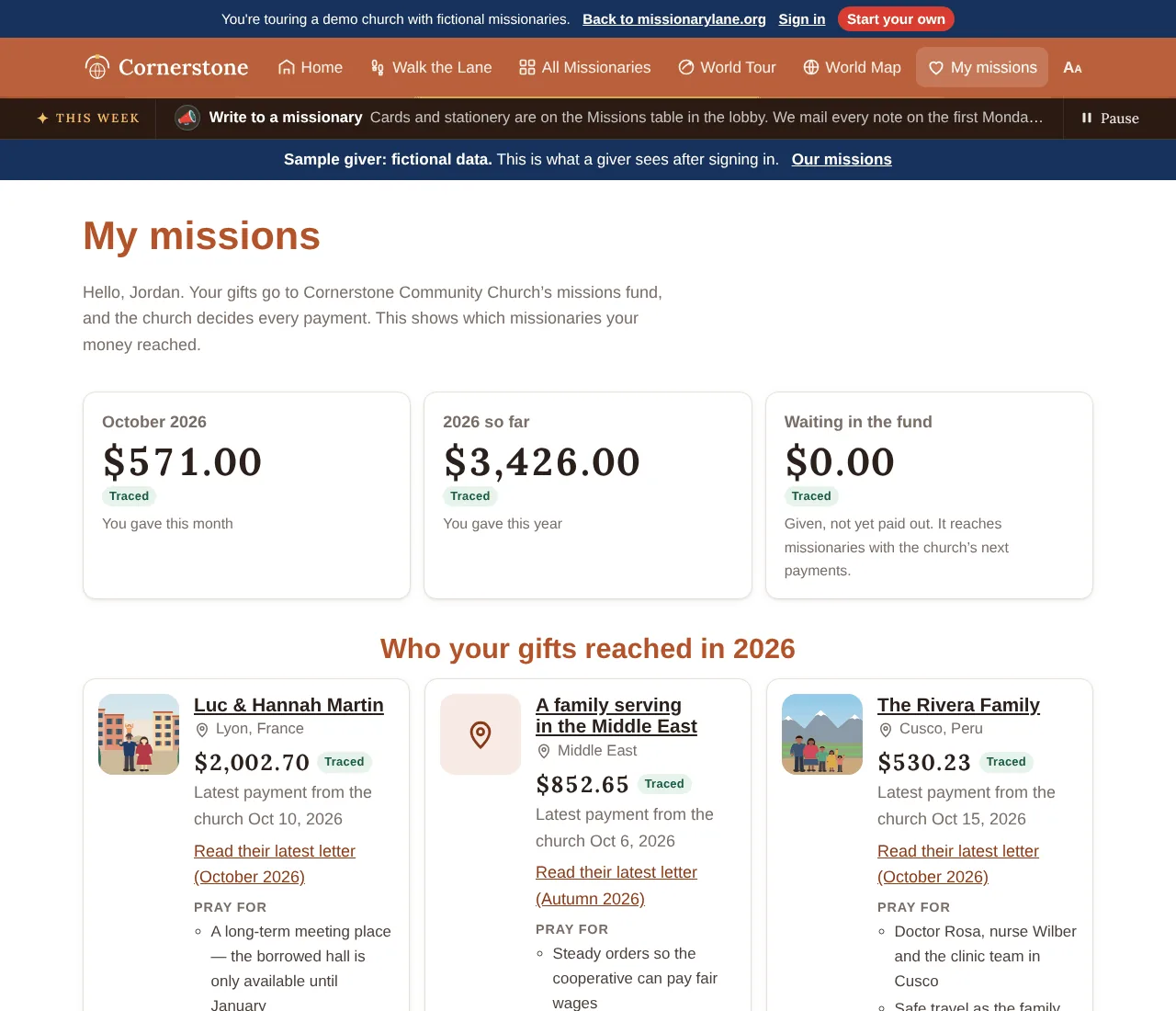
- This month and this year so far: what you gave to missions.
- Waiting in the fund: money you gave that hasn't been paid out yet. It reaches missionaries with the church's next payments.
- Where your gifts went: a world map with a line from your church to each missionary your money reached. Thicker lines and larger circles mean more money. A dashed line or circle is an Estimated amount. Use Show to see this year so far or a single month, and tap a circle or line for the name, place and amount. The list below the map has the same amounts. If your church hasn't set its location, the map shows the circles without lines.
- Who your gifts reached this year: each missionary, how much of your giving reached them, the date of the church's latest payment to them, a link to their latest letter and up to three of their prayer requests.
- Month by month: what you gave each month and who it reached.
- Your pledges, if the church records them: a faith promise with how much is given so far, or a pledge given straight to a mission agency (which isn't in the totals, because it didn't pass through the church).
- How we work this out: the labels below, where your gifts were read from, and the date the figures run to.
Only the missions part of your giving counts. If you give to a general fund, the page counts the share your church sends to missions, such as 10%.
The labels #
| Label | Means |
|---|---|
| Traced | Followed by date from your gift to a payment the church made. |
| Estimated | Your gift was recorded only as a monthly total, such as an envelope, so it's shared evenly across that month's payments. |
| Pledge | A promise you made, not money given yet. |
How a gift is followed to a payment, with an example, is on How giving works.
Missionaries in sensitive places #
If some of your giving reached a restricted missionary, they appear only by the public name your church chose, such as “A family serving in the Middle East”, with no photo or exact place. On the map their circle sits at a rounded place, the same as in the gallery.
Our missions #
Some churches also show Our missions, a public page with what the church sent each missionary and the total. Restricted missionaries are added together there as Restricted fields, without names. Its map shows what the church paid each missionary that month, with the same lines and circles; restricted missionaries aren't on it.
Try it in the demo #
The demo gallery shows My missions for a fictional sample giver without signing in, and its Support buttons explain what they would do instead of opening a giving page.
About tax receipts #
My missions isn't a tax receipt. Your giving statement comes from your church. See A note on taxes.